🧩 SHUFFLE BOARD

GAME SETUP
Think of this page as some technical information that provides further details about the game controls, none of which is essential for great gameplay. It's really aimed at those who want to more fully see what to expect before they start to play. If you are so minded, then please read on. If not, we suggest you jump right in and start playing. You can always return here if ever you find a need.
Game Setup is the temporary lift-up control drawer used to configure Shuffle Board.
Select Game Setup at the top-right of the screen to open it. The same controls are available on phones, tablets, laptops and desktop computers. They stack vertically on narrower screens and arrange horizontally when more width is available.
Opening Game Setup does not move, resize or reset the Shuffle Board. Closing it lets you return to an unobstructed board-first view.
OPENING AND CLOSING GAME SETUP
Select Game Setup at the top-right of the game screen.Close the drawer by:
- selecting only where needed the ✕ button;
- selecting the dimmed area behind the drawer; or
- selecting Play in Browser, Return to Game, or Resume & Return to Game, according to the current state of the puzzle.
Closing Game Setup does not change the puzzle, timer, moves or saved-game state.
CONTROLS ALWAYS AVAILABLE IN GAME SETUP
These remain available whenever Game Setup is opened:
MODE
Select Shuffle Board, Tray Board or Full Jigsaw.
Changing mode opens the selected game in its board-first view.
PIECES
Choose 9, 16, 36, 64 or 100 pieces.
Changing the number of pieces starts a fresh Shuffle Board game using the current picture.
STATS
Show or hide the time, best time, moves and best-moves panel.
CHOOSE PICTURE
Open the picture gallery and select another puzzle.
Choosing another picture starts a fresh Shuffle Board game and replaces the current Shuffle Board save.
PLAY FULL SCREEN
Open Shuffle Board in genuine fullscreen play.
The browser controls disappear and the game uses the available physical screen. Fullscreen controls are then available through the three-dot menu, top-right of screen.
BEFORE YOUR FIRST MOVE
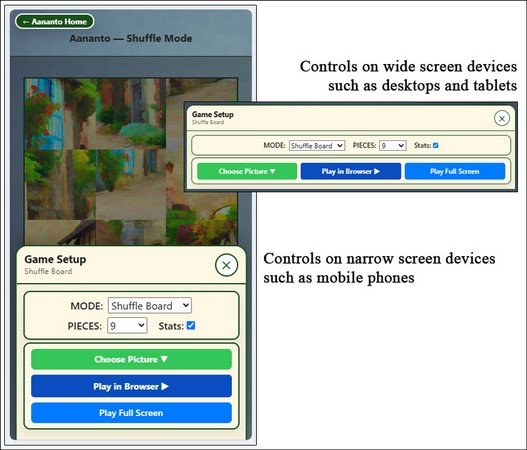
Make your choice of picture by using Choose Picture for the Shuffle Board game.Select Play in Browser to close Game Setup and begin playing in the normal browser view.
Select Play Full Screen for a more immersive experience.
Save & Pause is not shown until the first move has been made.
AFTER YOUR FIRST MOVE
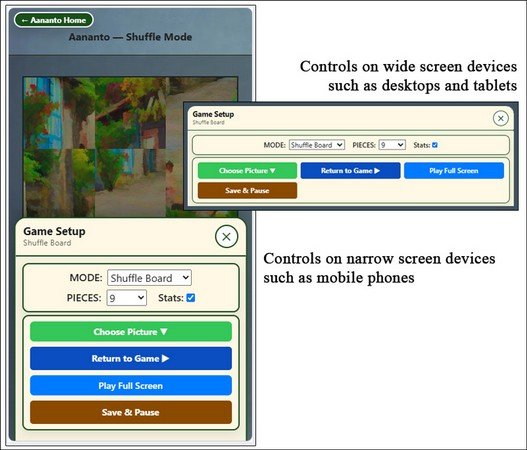
Select Return to Game to close Game Setup without changing the running game.
Select Save & Pause to save the current Shuffle Board position and stop the timer.After saving, Resume & Return to Game replaces Return to Game.
AFTER SAVING OR LOADING A SAVED GAME
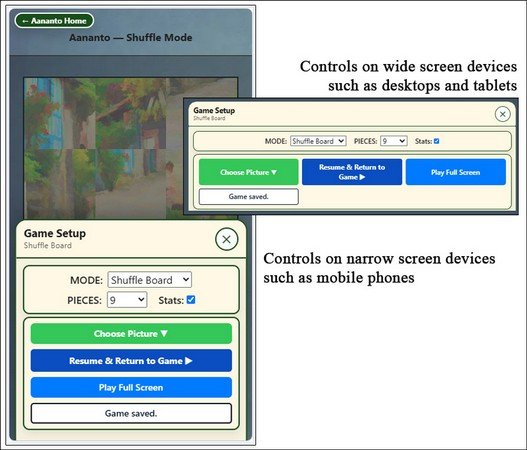
The white status cell confirms that the game has been saved or loaded.
Select Resume & Return to Game to restart the timer, close Game Setup and continue playing in one action.
AFTER COMPLETING THE PUZZLE
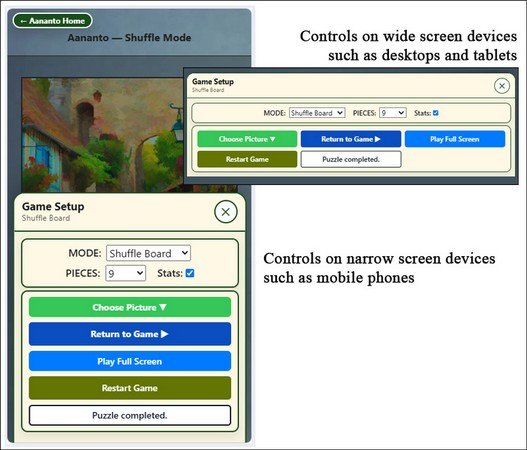
Select Restart Game to play the same picture and piece count again from a newly shuffled board.
Choose another picture or piece count to begin a different puzzle.The white status cell confirms that the puzzle has been completed.